

围绕视频生成能力、作品预览与产品行动入口组织页面,适合 AI 视频工具和创作平台。
LTX 视频创作产品页
效果案例
READY TO USE
直接开始使用
这条提示词无需补充变量,可查看并复制完整提示词。
复制后粘贴到任意 AI 平台即可直接使用
更新于 2026.10.14 · 持续复测
围绕视频生成能力、作品预览与产品行动入口组织页面,适合 AI 视频工具和创作平台。

「紫发金瞳波普风动漫少女」的 AI 图像提示词,适用于 GPT Image。通过效果图查看构图、光线与色彩方向,

「墨绿短发日常系动漫少女」的 AI 图像提示词,适用于 GPT Image。通过效果图查看构图、光线与色彩方向,
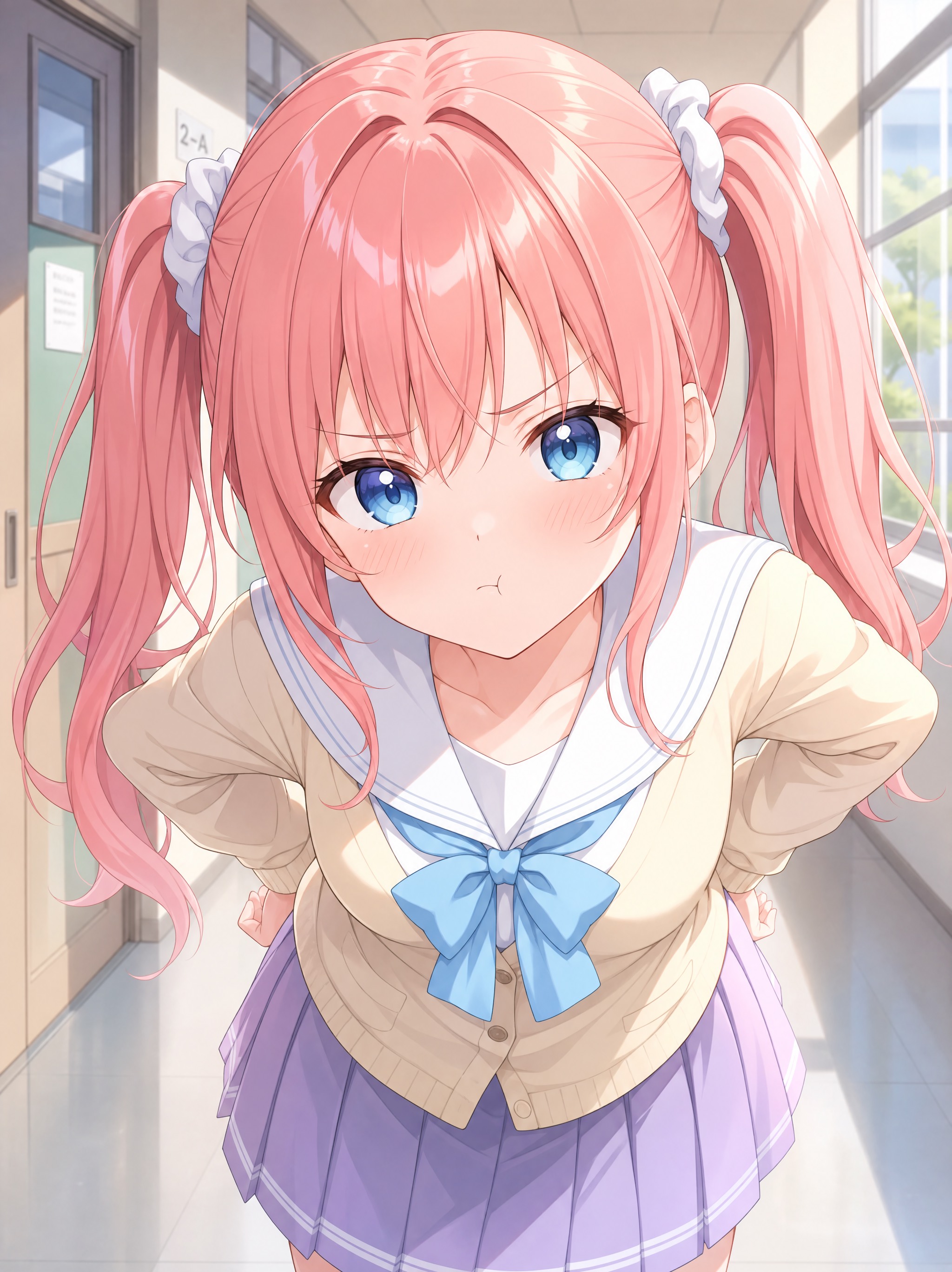
「珊瑚粉双马尾学园走廊少女」的 AI 图像提示词,适用于 GPT Image。通过效果图查看构图、光线与色彩方向

「蜜金发琥珀瞳学园少女动漫」的 AI 图像提示词,适用于 GPT Image。通过效果图查看构图、光线与色彩方向

「樱色双丸子头可爱少女动漫」的 AI 图像提示词,适用于 GPT Image。通过效果图查看构图、光线与色彩方向

「橙发麻花辫元气少女动漫」的 AI 图像提示词,适用于 GPT Image。通过效果图查看构图、光线与色彩方向,
查看完整提示词,复制后粘贴到任意 AI 平台使用。
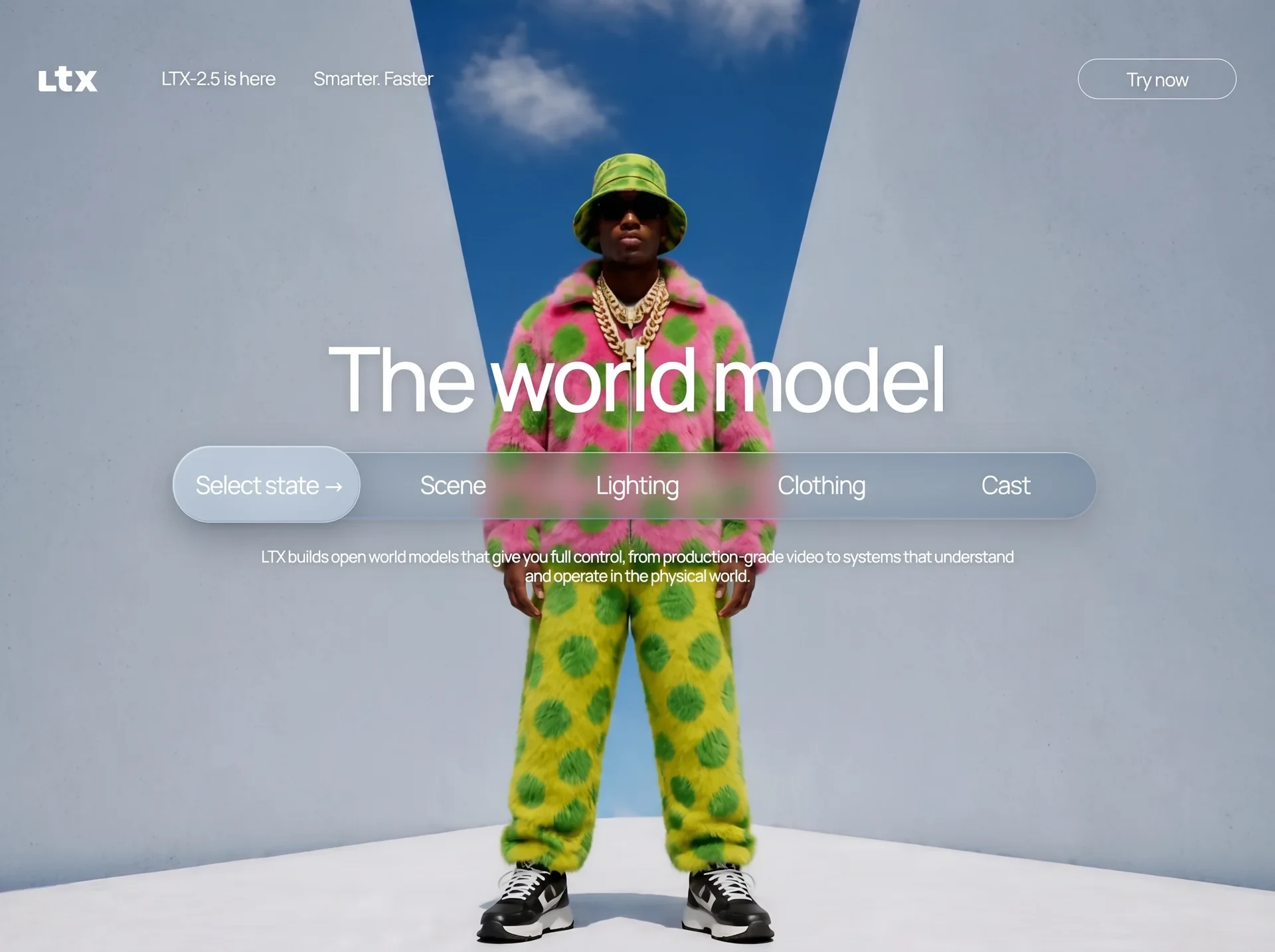
Build a single, self-contained `index.html` — no build step, no framework, no npm, no
external JS/CSS except the Google Fonts stylesheet. Vanilla HTML + CSS + ES5-compatible
JS in one file. All media is remote; the page must load zero local assets.

═══════════════════════════════════════════════════════════════════════
1. WHAT IT IS
═══════════════════════════════════════════════════════════════════════
A full-viewport cinematic fashion scene. A centered character stands between pale blue
architectural walls. A glass controller bar lets the visitor switch Scene, Lighting,
Clothing or Cast. Clicking a control plays a PRE-GENERATED video transition, holds the
destination on its final frame, and Reset plays the paired reverse clip back to base.

Click-driven, NOT scroll-scrubbed. No generation at runtime. No autoplay, no looping,
no audio, no cursor effects, no parallax, no extra sections, no footer, no cards.

Page title: `LTX — The world model`

═══════════════════════════════════════════════════════════════════════
2. MEDIA (Cloudflare R2 — use these URLs verbatim)
═══════════════════════════════════════════════════════════════════════
Base: https://pub-86dc5b5484314368ac5436a674b0d919.r2.dev/designs/

  Control    Forward              Reverse                      Duration (fwd / rev)
  Clothing   video-1.mp4          video-1-reverse.mp4          2.08 / 2.08
  Scene      video-2.mp4          video-2-reverse.mp4          2.08 / 2.08
  Lighting   video-3.mp4          video-3-reverse.mp4          2.08 / 2.04
  Cast       video-4.mp4          video-4-reverse.mp4          3.00 / 2.48

Eight persistent <video> elements, one per clip, each with a fixed `src` set in HTML.
NEVER remount or swap `src` on a visible element. Attributes on all eight:
`muted playsinline preload="auto" aria-hidden="true"`, no `controls`, no `loop`,
no `autoplay`. Only one may play at a time.

NO base still image. The base scene is `video-1.mp4` at frame 0 — park that element
paused at 0 as the opening visible layer once it has a decoded frame. Zero <img> tags.

Logo: inline the SVG markup directly in the header (viewBox "0 0 75 32", white fills,
the 3-path LTX wordmark). Do not link an .svg file.

═══════════════════════════════════════════════════════════════════════
3. FONT + GLOBALS
═══════════════════════════════════════════════════════════════════════
<link rel="preconnect" href="https://fonts.googleapis.com">
<link rel="preconnect" href="https://fonts.gstatic.com" crossorigin>
<link href="https://fonts.googleapis.com/css2?family=Manrope:wght@400;500;600;700&display=swap" rel="stylesheet">

  font-family: 'Manrope', system-ui, sans-serif   /* on body AND buttons */
  White text, #000 body background, antialiased, border-box everywhere, zero margin.
  ::selection { background: rgba(255,255,255,0.2); }
  :focus-visible { outline: 2px solid #fff; outline-offset: 3px; }
  body { overflow-x: hidden; }

Easing tokens on :root —
  --retake-ease:      cubic-bezier(0.22, 1, 0.36, 1);
  --retake-slow-ease: cubic-bezier(0.65, 0, 0.35, 1);

Meta viewport: width=device-width, initial-scale=1, viewport-fit=cover

═══════════════════════════════════════════════════════════════════════
4. STRUCTURE + LAYERS
═══════════════════════════════════════════════════════════════════════
.stage — position:relative; isolation:isolate; width:100%;
         height:100vh; height:100dvh; overflow:hidden; background:#000;

z-index: media 0 · hero copy 10 · controller 20 · header 30 · notice 40

All eight videos: `.media { position:absolute; inset:0; width:100%; height:100%;
object-fit:cover; object-position:center; z-index:0; pointer-events:none; }`
Hidden layers use `visibility:hidden`, revealed with `visibility:visible` — NEVER an
opacity crossfade between two scene states.

`.hero { position:absolute; inset:0; z-index:10; pointer-events:none; }`
Media and hero must not intercept clicks. No dark overlay, grade, noise, blur or
scale transform on the footage.

DOM order inside .stage:
  8 <video> · .hero (h1 + p) · .controller (.track, .capsule, .cells) · <header> · status + notice

═══════════════════════════════════════════════════════════════════════
5. HEADER (exact)
═══════════════════════════════════════════════════════════════════════
Grid `auto 1fr auto`, align-items center, absolute top, full width.
padding: calc(58px + env(safe-area-inset-top)) 40px 40px;
text-shadow: 0 1px 6px rgb(0 0 0 / 0.18);

Left: inline LTX SVG, height 24px, width auto, wrapped in <a aria-label="LTX home">.
Next to it, two spans: `LTX-2.5 is here` and `Smarter. Faster`
  .meta { margin-left: clamp(48px,5vw,70px); gap: clamp(28px,3vw,44px);
          font-size:18px; line-height:1.2; letter-spacing:-0.04em; }
Right: `Try now` → https://app.ltx.io/ , target="_blank" rel="noopener noreferrer"
  152×38px, radius 999px, 1px solid rgb(255 255 255 / 0.75), transparent fill, 18px.
  Hover/focus: white fill, color #0b1a26, 300ms color/background/border transition.

═══════════════════════════════════════════════════════════════════════
6. HERO COPY (exact strings)
═══════════════════════════════════════════════════════════════════════
h1 → `The world model`, as three spans: <span>The</span> <span>world</span> <span>model</span>
  top:35.9%; left:50%; translateX(-50%); width:min(901px, calc(100vw - 48px));
  font-size:clamp(62px,6.8vw,100px); weight 500; line-height:0.8;
  letter-spacing:-0.04em; white-space:nowrap; text-shadow:0 2px 12px rgb(0 0 0 / 0.14);
  Each span: transition opacity/filter/transform 900ms var(--retake-ease),
  delays 0 / 90 / 180ms. Hidden state (.stage.title-hidden):
  opacity:0; filter:blur(12px); transform:translateY(-10px);

p → `LTX builds open world models that give you full control, from production-grade video
to systems that understand and operate in the physical world.`
  top:calc(46.78% + 94px); left:50%; translateX(-50%);
  width:min(734px, calc(100vw - 48px)); font-size:clamp(14px,1.25vw,18px);
  weight 400; line-height:1.2; letter-spacing:-0.04em;
  text-shadow:0 1px 8px rgb(0 0 0 / 0.16);
  Stays visible at all times, including the selected state.

═══════════════════════════════════════════════════════════════════════
7. CONTROLLER — EXPANDED (desktop)
═══════════════════════════════════════════════════════════════════════
.controller { position:absolute; top:46.78%; left:50%; transform:translateX(-50%);
              width:min(880px, calc(100vw - 48px)); height:72px; z-index:20; }
role="group" aria-label="Scene state controller"

Five equal columns, in this order:
  `Select state →` (non-interactive div) | Scene | Lighting | Clothing | Cast (4 buttons)

.cells { position:absolute; inset:0; display:grid; grid-template-columns:repeat(5,1fr);
         align-items:center; }
.cell  { display:flex; align-items:center; justify-content:center; height:100%;
         padding:0 14px; font-size:23px; weight 400; line-height:1.2;
         letter-spacing:-0.04em; white-space:nowrap;
         transition: opacity 420ms var(--retake-ease), filter 420ms var(--retake-ease),
                     transform 980ms var(--retake-slow-ease); }
Buttons: transparent background, border 0, border-radius 999px, cursor pointer.
Center each label with its real grid cell — no per-word manual offsets.

Rear track: top:4px; left:0; width:100%; height:64px; radius 999px.
Foreground capsule: height:72px; top:-1px.
  ⚠ The spec value is "-5px relative to the TRACK". The track sits at 4px, so on the
  controller that is -1px, giving an even 5px-above / 3px-below overhang. Using -5px
  here makes it hang 9px off the top and only 1px below — visibly top-heavy. Use -1px.

Capsule position comes from CSS CUSTOM PROPERTIES, never inline left/width:
  .capsule { left: var(--cap-left, -5px); width: var(--cap-width, calc(20% + 5px)); }
  ⚠ Inline styles outrank `.controller.collapsed .capsule`, so setting left/width
  directly leaves the capsule stuck at the left edge when it collapses.

Positions (index 0 = the label, 1–4 = the buttons):
  0: left -5px,  width calc(20% + 5px)     ← 5px protrusion prevents edge pinching
  1: left 20%,   width 20%
  2: left 40%,   width 20%
  3: left 60%,   width 20%
  4: left 80%,   width calc(20% + 5px)     ← 5px protrusion

Hover or keyboard focus moves the capsule to that button (620ms, --retake-ease).
Pointer exit returns it to index 0 unless a button still holds keyboard focus.
While any button is highlighted, `Select state →` drops to opacity 0.5 (300ms).
Hover NEVER changes the scene.

Pointer movement updates `--glass-x` / `--glass-y` on the controller (percentages) to
move the highlight origin. No re-render, no layout work, no video movement.

═══════════════════════════════════════════════════════════════════════
8. GLASS MATERIAL (verbatim)
═══════════════════════════════════════════════════════════════════════
Rear track:
    background: rgb(24 55 82 / 0.31);
    border: 1px solid rgb(255 255 255 / 0.2);
    backdrop-filter: blur(9px) saturate(126%) contrast(108%) brightness(103%);
    box-shadow:
      0 14px 38px rgb(4 24 43 / 0.16),
      0 2px 7px rgb(4 24 43 / 0.1),
      inset 1px 1px 0 rgb(255 255 255 / 0.48),
      inset -1px -1px 0 rgb(21 49 73 / 0.14),
      inset 0 0 0 0.5px rgb(255 255 255 / 0.16);

Foreground capsule:
    background: rgb(246 251 255 / 0.24);
    border: 1px solid rgb(255 255 255 / 0.28);
    backdrop-filter: blur(13px) saturate(128%) contrast(107%) brightness(105%);
    box-shadow:
      0 11px 28px rgb(4 24 43 / 0.17),
      0 2px 6px rgb(4 24 43 / 0.1),
      inset 1px 1px 0 rgb(255 255 255 / 0.62),
      inset -1px -1px 0 rgb(20 49 73 / 0.18),
      inset 0 0 12px rgb(255 255 255 / 0.055);

Include -webkit-backdrop-filter alongside every backdrop-filter.

Two pointer-inert pseudo-elements on each (.glass::before / ::after):
  ::before — broad soft highlight, peak alpha ≤ 0.25:
    background:
      radial-gradient(120% 150% at var(--glass-x,24%) var(--glass-y,8%),
                      rgb(255 255 255 / 0.25), rgb(255 255 255 / 0) 53%),
      linear-gradient(115deg, rgb(255 255 255 / 0.10), rgb(255 255 255 / 0) 42%);
  ::after — masked 1px perimeter:
    padding:1px;
    background: conic-gradient(from 225deg, #7fe3ff, rgb(255 255 255 / 0.35), #ffffff,
                               #ffd7e6, rgb(255 255 255 / 0.35), #7fe3ff);
    -webkit-mask: linear-gradient(#000 0 0) content-box, linear-gradient(#000 0 0);
            mask: linear-gradient(#000 0 0) content-box, linear-gradient(#000 0 0);
    -webkit-mask-composite: xor; mask-composite: exclude;
    Opacity 0.27 on the track, 0.30 on the capsule.

Subtle edge accent, not a rainbow fill. No heavy white strokes, bevels, chrome rims,
milky opaque fills, or black/gray track colors. No shader engine, canvas or WebGL.

═══════════════════════════════════════════════════════════════════════
9. STATE MACHINE
═══════════════════════════════════════════════════════════════════════
  scene:    'base' | 'scene' | 'light' | 'colorway' | 'fullLook'
  playback: loading | ready | starting | playing | error
  direction: forward | reverse

Only valid flow:  base → forward(branch) → selected(branch) → reverse(branch) → base
NO branch-to-branch. Clicking another control while a branch is selected does nothing —
Reset must return to base first. States never combine; the footage has no such clips.

Per-clip terminal hold guards (seconds before duration):
  default 0.08 · Scene REVERSE 0.18   ← verified empirically, keep both
Also keep an `ended` listener as a fallback, but never rely on it alone.

═══════════════════════════════════════════════════════════════════════
10. MOTION CHOREOGRAPHY
═══════════════════════════════════════════════════════════════════════
FORWARD (on click):
 · Acquire the playback lock SYNCHRONOUSLY, before any await, and disable all buttons.
 · Collapse: capsule → left:calc(50% - 100px); width:200px over 980ms --retake-slow-ease,
   settling to background rgb(246 251 255 / 0.14).
 · Rear track → left:calc(50% - 96px); width:192px  (8px narrower than the capsule,
   centered under it).
 · Other labels fade out 420ms: opacity 0, blur(10px), scale(0.94), pointer-events none.
 · The chosen label travels to the capsule centre via transform: translate(dx,dy),
   measured with getBoundingClientRect against the capsule's target centre.
 · Rear material fades ONLY after collapse: opacity 0,
   `transition: opacity 400ms linear 650ms` — apply this class in the SAME style recalc
   as the collapse class. Never `display:none`, never abruptly drop blur/border.
 · Title hides at ~12% of forward progress, clamped: `min(duration * 0.12, 0.9)` seconds.
   Words fade to opacity 0, blur(12px), translateY(-10px) over 900ms, stagger 0/90/180ms.

SELECTED:
 · Video paused on its valid terminal frame. One centered glass capsule 200×72,
   no visible rear bar. Chosen label becomes `Reset` with a 520ms opacity/blur reveal
   (keyframes: opacity 0 + blur(10px) → opacity 1 + blur(0)), underlined,
   text-underline-offset 3px, thickness 1px.
 · Reset only actionable after forward completes. Other buttons get
   `disabled`, `aria-hidden="true"`, `tabindex="-1"`.

REVERSE (Reset):
 · Start the reverse clip AND expand the bar in parallel — do not wait for completion.
 · Fade Reset out while the bar opens over 980ms; restore option labels over 760ms
   after a 60ms delay, kept disabled until reverse completes.
 · Restore the rear material smoothly; capsule returns to index 0.
 · Title stays hidden through reverse, then reveals when base commits.
 · Never leave an empty capsule hanging mid-screen with no motion.

═══════════════════════════════════════════════════════════════════════
11. SEAM-SAFE PLAYER (the hard part)
═══════════════════════════════════════════════════════════════════════
On an accepted click:
 1. Capture a unique transition token; lock input synchronously.
 2. Keep the previously displayed frame visible and paused.
 3. Rewind the hidden target video to 0; await its `seeked` when currentTime > 0.001.
 4. Register the first-frame callback BEFORE calling play(); handle play()'s rejection
    by rejecting the chain (`Promise.all([playPromise, framePromise])`) — a bare
    `.catch(){throw}` does not propagate and the transition hangs until timeout.
 5. Reveal only when a decoded frame from THIS request is ready. With
    requestVideoFrameCallback, require `meta.mediaTime <= 0.5 && readyState >= 2` —
    a stale endpoint frame carries a large mediaTime, so keep waiting.
 6. Without rVFC, fall back to checked readiness + `playing` + double-rAF ticks.
    A TIMEOUT MUST NEVER COUNT AS SUCCESSFUL DECODING.
 7. Switch visibility atomically. Never crossfade two different scene states.
 8. Monitor only the ACTIVE video near its hold time; pause it on the terminal frame,
    then commit the scene state.
 9. Release the lock and update controller semantics exactly once.

First-frame timeout: 12000ms, but PAUSE the deadline while `document.hidden` — frame
callbacks freeze in a background tab and a naive timer fires a false error. On hide,
also pause the pending clip and rewind it to 0; on show, restart the timer and replay.

Track readiness for all eight clips: check `readyState >= 2` up front (cached media may
never fire `loadeddata` again) AND listen for `loadeddata`. Enable each control only
when its own forward+reverse pair is ready.

After BOTH forward and reverse, the visible video stays on its held frame. Never swap
to a still, never rewind the visible clip, never reveal another clip as a placeholder.

Guard every async callback, retry and completion handler with the transition token;
ignore stale events. Clean up frame callbacks, rAF loops, timers and listeners.
Keep locks and per-frame progress in refs — do not re-render per frame.

Rapid or double clicks must not queue competing transitions (synchronous lock + all
buttons disabled in the same tick).

On failure: preserve the last valid frame, announce the error, show a `Retry` button.
Never claim the target scene completed. Never leave the controller permanently locked.

═══════════════════════════════════════════════════════════════════════
12. RESPONSIVE
═══════════════════════════════════════════════════════════════════════
@media (max-width:900px)
  header padding calc(24px + env(safe-area-inset-top)) 24px 24px;
  .meta 14px / gap 22px / margin-left 34px; Try now 116×36, 14px;
  .cell font-size clamp(17px, 2.5vw, 24px)

@media (max-width:700px)
  header padding-left/right 18px; logo height 21px; .meta 12px;
  hide `Smarter. Faster`; Try now 92×34 @13px with an ::after inset -6px -10px hit area.
  h1: top 34%; width calc(100vw - 40px); clamp(48px,14vw,64px); line-height .88;
      white-space normal — two lines across the CHEST, never the face.
  p: top 77%; width calc(100vw - 44px); 14px.
  .controller: top 53%; width calc(100vw - 40px); height 156px.
  .track: top 0; height 156px; border-radius 28px.
  .cells: 2 columns; rows 48px / 54px / 54px. `Select state →` spans both columns
          (grid-column 1 / -1), then Scene|Lighting, then Clothing|Cast.
          1px dividers at rgb(255 255 255 / 0.12); labels 17px, centered.
  Disable the sliding hover capsule here: `.capsule { opacity:0; pointer-events:none; }`
  Use a restrained :active / :focus-visible cell treatment (outline-offset -3px).
  Collapsed/selected capsule: opacity 1; left 50%; top 4vh; top 4dvh;
      transform translate(-50%,-50%); 196×64; radius 999px; bg rgb(246 251 255 / 0.18).
      ⚠ Do NOT use position:fixed. The controller has a transform, so it becomes the
      containing block and `top:57%` resolves against the controller, dropping the
      capsule ~55px below its label. Offset from the controller's own top instead
      (53dvh + 4dvh = 57dvh centre).
      The mobile selected state must show ONE visible glass surface — never hide the
      foreground while the rear is also transparent.

@media (max-width:700px) and (max-height:700px)   /* short phones, e.g. 320×568 */
  .controller top 50%;  .hero p top calc(50% + 168px); width calc(100vw - 32px); 13px

@media (max-height:520px) and (orientation:landscape)
  h1 top 20%, clamp(34px,8vh,56px); .controller top 50%; p top auto; bottom 8px; 13px

@media (max-width:700px) and (max-height:520px) and (orientation:landscape)
  h1 top 12%, clamp(28px,7vh,44px); .controller top 46%, height 118px; .track 118px;
  rows 36/41/41; .cell 15px; p bottom 6px, 12px

Test 1440×900, 1920×1080, 390×844, 320×568 and a short landscape. Never clip controls,
never overlap the copy with the controller, never place text across the face. Media crop
stays identical between clips through any resize.

═══════════════════════════════════════════════════════════════════════
13. ACCESSIBILITY
═══════════════════════════════════════════════════════════════════════
· Buttons for actions, links for navigation; Enter and Space work.
· Polite live region (visually-hidden) announcing loading, selection, transitions, errors.
· Invisible/disabled controls leave the tab order (tabindex -1 + aria-hidden).
· ⚠ Disabling the focused button drops focus to <body>. Capture whether the originating
  button held focus BEFORE disabling, and restore it with `focus({preventScroll:true})`
  once it becomes Reset — and again when it reverts to its option label. No scrolling.
· Touch targets ≥ 44px where practical.
· @media (prefers-reduced-motion: reduce): force transition-duration 1ms and
  transition-delay 0 on capsule/track/cells/title/Try now; drop the blur filters.
  Never autoplay; a requested transition may still play once.
· Keep backdrop-filter local to the small controller — no full-screen blur, no canvas
  frame extraction, no WebGL, no frame interpolation.

═══════════════════════════════════════════════════════════════════════
14. KNOWN PITFALLS — these only appear in a real browser
═══════════════════════════════════════════════════════════════════════
 1. Inline `left`/`width` on the capsule beat the collapsed rule → use custom properties.
 2. `position:fixed` inside the transformed controller resolves against the controller,
    not the viewport → the mobile capsule detaches from its label.
 3. Deferring the rear-track fade with setTimeout races an early failure that already
    reopened the bar, leaving the track invisible → apply it in the same recalc and let
    the CSS 650ms delay do the waiting.
 4. Disabling the focused control silently loses keyboard focus.
 5. `top:-5px` on the controller (rather than relative to the track) makes the capsule
    hang off the top edge.

═══════════════════════════════════════════════════════════════════════
15. ACCEPTANCE
═══════════════════════════════════════════════════════════════════════
All eight clips reach readyState 4 from R2 with durations 2.08 ×5, 2.04, 3.00, 2.48.
Each forward pauses ~0.04–0.08s before its end; Scene reverse holds ~0.17s before its end.
All four cycles run three times each with no black flash, base-frame blink, crop jump or
scale jump at either seam. Reset never strands an empty capsule. The rear bar fades under
the foreground capsule and is absent in the final state. Hover and focus capsules align
with every label including both outer positions. Try now opens in a new tab and the media
layers do not intercept clicks. Deliver the finished single file.
提示词已复制,选择一个常用平台继续。
